
Game Introduction
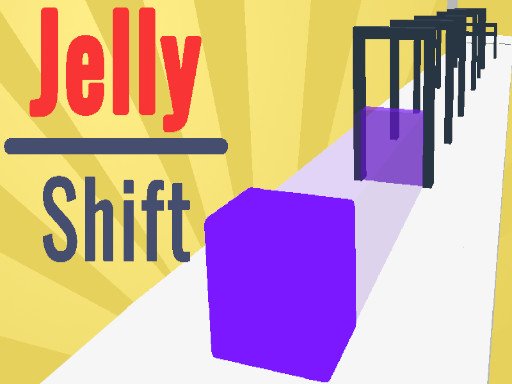
Jelly Shape: Lite is a free online puzzle game where players guide a flexible jelly character through a series of creative challenges. The core objective is to reshape the jelly so it can pass through differently shaped openings and reach a target zone. Each level presents a unique layout with moving parts and changing paths that influence the jelly’s journey. The game stands out for its simple yet engaging mechanics, requiring both quick thinking and careful planning. With bright, cheerful visuals and no violent or inappropriate content, it provides a safe and relaxing experience for players of all ages. The optional collection of shiny crystals adds an extra layer of fun, allowing players to unlock new appearances for their jelly. This game is designed to be accessible and enjoyable, making it a great choice for casual play or a quick mental break.
How to Play
Players typically control the jelly by dragging or tapping on the screen to stretch and compress its form. The goal is to match the jelly’s shape to the outline of the opening in each puzzle. As players progress, they encounter various obstacles, such as moving barriers or shifting pathways, that require timely adjustments. The game provides clear visual feedback, so players can see when the jelly fits correctly or needs further reshaping. Crystals are placed throughout the levels; collecting them is optional but rewarding. The difficulty increases gradually, starting with simple shapes and moving to more complex arrangements that demand precise movements and quick decisions.
Game Features
Jelly Shape: Lite offers free online play with no downloads required. The main feature is the shape-shifting mechanic, where players dynamically alter the jelly’s form to solve puzzles. Levels include interactive elements like moving obstacles and changing paths that keep the gameplay fresh. A crystal collection system allows players to earn rewards, which can be used to unlock a variety of skins for the jelly, adding a personalization aspect. The game’s intuitive controls make it easy for anyone to pick up and play, while the increasing difficulty ensures a steady challenge. All content is family-friendly, with no violence or mature themes.
Tips for Success
Practice reshaping the jelly quickly to adapt to sudden changes in the environment. Focus on collecting crystals in each level, as they provide access to new skins that can make the game more enjoyable. Observe the layout of each puzzle before making a move, and try to anticipate how obstacles will move. Starting with easier levels helps build familiarity with the controls and mechanics. Patience is key; each attempt provides a better understanding of the level’s design.



Comments
0 comments