Bowling Arcade Challenge

Bowling Arcade Challenge

Developer: Mud Veil Interactive
Published: 1746460800
Updated: 2026-07-03
Ball Sports Bowling

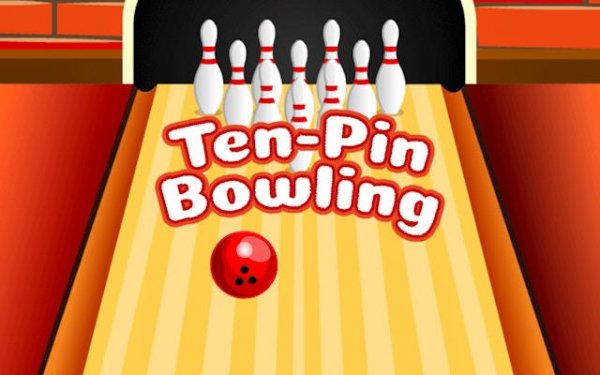
Bowling Arcade Challenge captures the essence of real bowling with its realistic physics engine and intuitive controls. The graphics are vibrant and the lane view is panoramic, enhancing immersion. The game is easy to pick up but offers depth for those who want to improve their aim and spin. It is perfect for short breaks or longer practice sessions. A great choice for bowling fans.

About This Game

Game Introduction

Bowling Arcade Challenge brings the classic sport of bowling to your screen. The core objective is to knock down all ten pins at the end of a lane using a bowling ball. This game captures the authentic feel of a real bowling alley in a convenient digital format. You control your throw by adjusting the angle and position of the ball on the lane. The realistic physics engine simulates speed, spin, and pin reactions, so every shot matters. The goal is simple: knock down all ten pins to achieve strikes and spares, maximizing your score across ten frames. Whether you have a few minutes or want a longer session, this game offers a satisfying challenge that rewards practice and precision.

How to Play

To play, start by aiming your shot. Use the on-screen controls to move the ball left or right and adjust the aiming arrow. Next, set the power of your throw by holding and releasing a power meter. Finally, add spin by swiping or using a spin control, which affects how the ball curves down the lane. Release to bowl. Watch the ball travel and see how it interacts with the pins. After each frame, you get a new chance to improve. The game tracks your score automatically, so you can focus on your technique.

Game Features

Features of Bowling Arcade Challenge include: Smooth and vibrant graphics that create an immersive lane environment. A realistic physics engine that makes each throw feel unique. Balanced gameplay that is easy to learn but offers depth for improvement. Accessible controls designed for quick play on any device. A panoramic game view that shows the entire lane and pin setup.

Tips for Success

You will enjoy this game because it offers a genuine bowling experience without leaving home. It is relaxing yet engaging, perfect for short breaks or extended practice. The clear feedback on each throw helps you learn and get better over time. To improve, focus on consistent aim and power control. Practice adjusting spin to master curve shots. Study pin reactions to understand how to convert spares. Regular play will build your skills and scores.
Compatibility

This H5 game runs smoothly on:
• Desktop computers (Windows / Mac) • Mobile phones (iPhone / Android)
• Tablets (iPad / Android)
🌐 Best experienced with Chrome, Safari, or Edge

Reviews

Bowling Arcade Challenge captures the essence of real bowling with its realistic physics engine and intuitive controls. The graphics are vibrant and the lane view is panoramic, enhancing immersion. The game is easy to pick up but offers depth for those who want to improve their aim and spin. It is perfect for short breaks or longer practice sessions. A great choice for bowling fans.

Faq

Can I play Bowling Arcade Challenge offline?
The game may require an internet connection for initial download or updates, but once installed, many similar games offer offline play. Check the app store description for specific offline capabilities.
Is there a multiplayer mode in Bowling Arcade Challenge?
The game description focuses on single-player scoring across ten frames. Some bowling games include a local multiplayer option where players take turns, but this is not confirmed for Bowling Arcade Challenge.
Does Bowling Arcade Challenge have different lane conditions or oil patterns?
The game features a realistic physics engine, which may simulate varying lane conditions. However, the description does not specify different oil patterns. Players can expect consistent lane behavior for practice.
How is the scoring system explained in Bowling Arcade Challenge?
The game automatically tracks your score across ten frames. Standard bowling scoring applies: a strike earns 10 points plus the next two rolls, a spare earns 10 plus the next roll. The game handles calculations for you.
Can I customize my bowling ball or character in Bowling Arcade Challenge?
The description does not mention customization options. Some bowling games allow ball color or weight changes, but this is not confirmed for Bowling Arcade Challenge. Players may have a standard ball and lane setup.
Does Bowling Arcade Challenge include a tutorial for beginners?
The game's How to Play section provides clear instructions on aiming, power, and spin. While a separate tutorial mode is not mentioned, the controls are designed to be accessible for quick learning.

Comments

0 comments
U
User
Loading comments...